
Wiki
Users
Create and manage uVersion accounts: roles, password, deactivation, permanent deletion, licence seats. Who can do what between super admin and project_admin.
Introduction
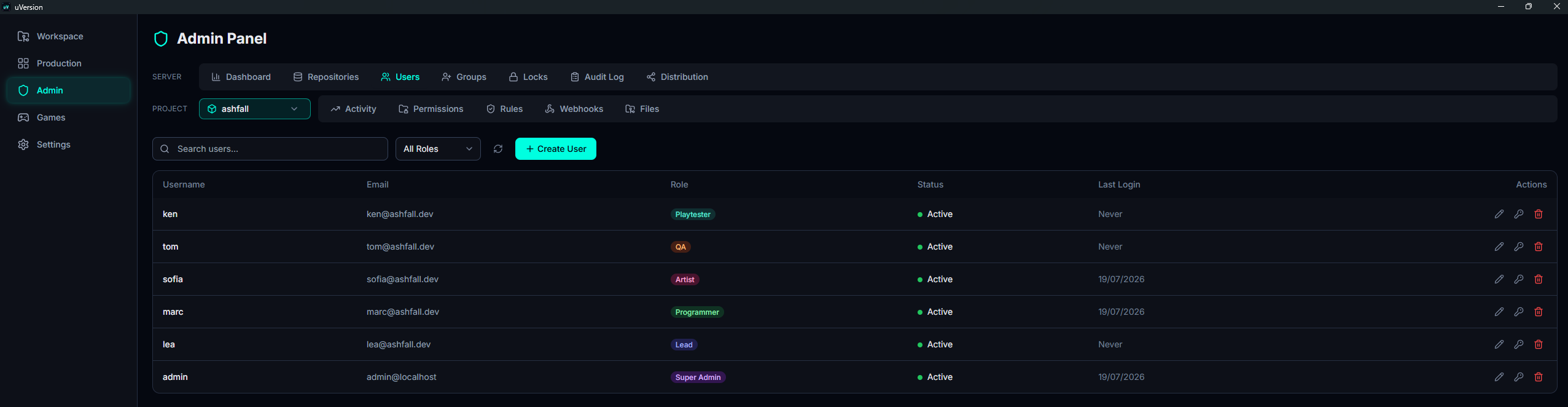
The Users tab of the admin panel is where you create accounts, assign them a role, reset a password, deactivate or reactivate an account, and delete it permanently. For each user the list shows their name, their email, their role, their status (Active / Inactive) and their last login.
It lives in the SERVER row of the panel, the one that concerns the whole server, and not in the PROJECT row which concerns only the repository selected right beside it: an account belongs to no project.
The role is the label that says what an account is allowed to do on the server
(admin, artist, viewer, etc.). It is assigned here, and its detail is
explained in Roles & admin panel. A repository is a project versioned
on the server; a lock is the reservation a user places on a file
while they are modifying it.
Who sees what, who can do what
Two roles open this tab, and they do not have the same actions there.
Super admin (admin role)
They see every account and have every action available: create, edit, reset the password, deactivate, reactivate, delete.
project_admin
Their list is not scoped: as soon as they administer at least one repository, they see every account except the super admins, with their email, their status and their last login. This is deliberate: managing people's roles assumes knowing who exists. If they administer no repository, they see nobody and can act on nobody.
What they can do:
- Create an account, with a role strictly below their own.
- Edit an existing account (Edit button): its email and its
role. The new role is capped strictly below their own: never
admin, neverlead, never anotherproject_admin.
What they cannot do:
- Act on a super admin, who does not even appear in their list.
- Reset a password: choosing someone's password amounts to being able to log in as them and inherit all their access.
- Toggle Active / Inactive: deactivation cuts access to all of the server and moves the licence seat counter, which is beyond the scope of a project.
- Delete an account.
lead ranks above a project_admin, so the latter cannot
assign the lead role. But nothing stops them from selecting an account that is already
lead and giving it a lower role: the cap applies to the role assigned, not to the current role
of the target. Only entrust the project_admin role to people you trust.
Create a user
1. Open the Users tab
In the sidebar, open Admin, then the Users tab of the SERVER row. The toolbar carries a search field, an All Roles filter and, on the far right, the + Create User button. Below it, the table lists the existing accounts.
2. Open the creation form
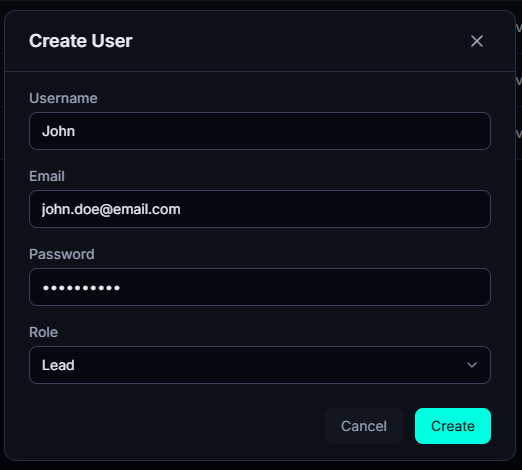
Click + Create User. A Create User window opens with four fields,
all empty except the Role selector, which defaults to user.
3. Fill in the fields and confirm
| Field | Constraint |
|---|---|
| Username | 1 to 100 characters, unique. It can no longer be changed afterwards. |
Not empty, must contain @, unique. | |
| Password | At least 8 characters. |
| Role | One of the 9 roles. Defaults to user. |
A username or an email already taken is rejected (conflict error).
Click Create. The account is active immediately and at once consumes a licence seat.
Choosing the role
The selector lists all 9 roles, but you can only assign a role strictly below your own
rank. A lead therefore cannot create an admin, and nobody can create
an account of a rank equal to or higher than their own. See Ranks and guard.
Edit an account
1. Spot the actions on the row
Everything starts from the Actions column, on the right of the account's row. They are textless icons, and they are not all visible to everyone:
- Pencil (Edit): opens the edit window. It is the only action open to a project_admin.
- Key (Reset Password): super admin only.
- Green check (Reactivate): super admin only, and only on the row of an inactive account.
- Red trash (Delete): super admin only, on an active account as well as an inactive one.

2. Change the email or the role
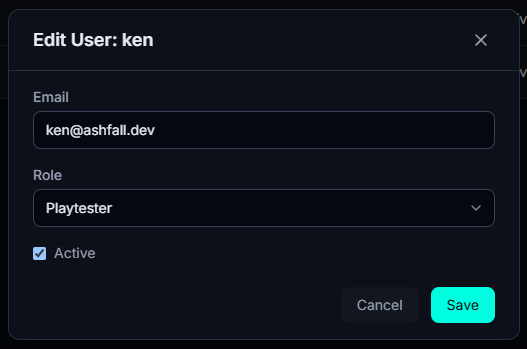
The pencil opens the Edit User window, which carries the account name in its title. It contains:
- Email: editable.
- Role: editable, within the limit of the rank of whoever is editing (see above).
- Active: the checkbox that activates or deactivates the account. It appears only for a super admin. A project_admin does not see it and the server would refuse it anyway.
The username cannot be changed: it identifies the account throughout the whole history, so there is no field for it.
3. Save
Click Save. The change is applied at once, with no restart and no delay.
Two safeguards apply to yourself: you can neither demote yourself ("Cannot demote yourself"), nor deactivate yourself ("Cannot deactivate yourself").
The same window seen by a project_admin
A project_admin opens the same window, with the email and the role, but without the Active checkbox: they can neither suspend nor reactivate an account. Their role selector also stays capped strictly below their own rank.

Reset the password
Reserved for the super admin.
1. Open the reset window
On the account's row, click the key icon (Reset Password), the second in the Actions column. The window carries the account name in its title: this is the moment to check you are aiming at the right one.
2. Enter the new password
The New Password field expects at least 8 characters, otherwise the confirm button stays inactive. Finish with Reset Password.
Deactivate, reactivate
Deactivating an account is suspending it without destroying anything: the person can no longer log in, but the account, its name and its access stay in place and you can reactivate it later. This is what to do for a temporary departure, a finished internship, or a contractor between two assignments.
Active checkbox in the edit window
(pencil icon), then Save. This checkbox is reserved for the super admin.
1. Deactivate
Pencil icon on the account's row, untick Active in the window shown
above, then Save. The person is signed out of all their clients and
can no longer log in. You cannot deactivate yourself.
2. Reactivate
A Reactivate button (green check) appears on the row of inactive accounts, and on them only. It is visible only to a super admin, and reactivation consumes a licence seat again: it fails if the quota is full.
A deactivated account keeps its history (who committed what) and lets the person come back without recreating an account.
Delete an account
1. Click the trash icon
The Delete button (red trash, the last icon in the Actions column) is reserved for the super admin and shows on both an active account and an already deactivated one.
2. Read the confirmation, then confirm
The Delete User window names the account targeted, lists what is going to be erased and reminds you
that you must untick Active to only suspend someone. Read it: it is the last stopping point, the
Delete button asks nothing more after that.

What deletion erases
In a single transaction:
- The username is replaced by an anonymous identifier of the form
deleted_42, and the original name therefore becomes available again for a new account. - The email is erased and the password made unusable.
- The sessions are revoked: the account is signed out of all its clients immediately.
- Its locks are released, which makes its files editable again by the team.
- All its permissions, its group memberships, its project_admin rights and its build access are removed.
- Its task assignments, its file watches and its pending notifications are removed.
- The account disappears from the list of users.
What survives, deliberately: the history. Its commits, its audit entries, its tasks and its comments stay in place, attributed to a deleted account. Nothing is rewritten in the repository.
Two refusals to know about: you cannot delete yourself, and if an account already carries
the reserved name (deleted_<id>), deletion is refused with a message that tells you which one
to remove first. A super admin can, however, delete another super admin: it is the only way to remove
a second super admin created by mistake.
Licence seats
Common pitfalls
Reactivation refused even though the account exists
Two possible causes, and the message tells them apart:
- "seat limit": the seat quota is full. Deactivate another account first, or add seats.
- "This account was deleted and can no longer be modified": the account was deleted, not deactivated. It is not recoverable. Recreate an account; its old username is available again.
"I don't see a user in my list"
Three causes, and three only:
- It is a super admin and you are a project_admin: super admins are hidden from your list, since you cannot act on them anyway.
- The account was deleted: it will never reappear.
- You are a project_admin and you no longer administer any repository: in that case your list is entirely empty. Ask a super admin to attach you to a project.
Outside these three cases, a project_admin sees every account on the server: there is no need to grant them a permission to make one visible.
A role change does not "take"
The change is immediate on the server side, but the affected user is signed out: they must log back in for their client to reflect the new role.
"I tried to suspend someone and the account disappeared"
You used Delete instead of unticking Active. Deletion is
permanent: the account is not recoverable and will have to be recreated, then its
permissions, its groups and its build access reassigned one by one. Its commit history, though, is not lost.