
Wiki
Validation rules
Asset validation checks run at check-in from the Unreal editor: the 9 built-in rules, the error / warning / info severities, JSON config, export / import / reset, and the limitation to know about.
Introduction
Validation rules are Unreal asset checks run at check-in time from the Unreal editor: naming, texture size, missing dependencies, and so on. They enforce studio conventions automatically, before content enters the repository (the project versioned on the server). They are configured per repository.
Where the rules actually apply
uversion checkin) or from the Rider plugin
entirely bypasses the validation policy, with no error and leaving no trace.
This is not a misconfiguration on your part: it is how it currently works. The rules apply to Unreal assets
(.uasset, .umap) and inspecting them requires the editor open, with the project loaded.
So treat them as a safeguard for artists working in the editor, not as a barrier no one can get
past.
Two practical consequences:
- If a convention must be guaranteed and not merely encouraged, plan an additional control (review, build-side check): the rules alone do not ensure it.
- If a rule "never triggers" for someone, first check where they submit from. An artist who submits from the desktop client will see no validation, whatever the configuration.
Access and roles
The Rules tab is available to the super admin and to the project_admin on the repositories they administer.
Severities
The severity decides what happens in the Unreal editor when an enabled rule fails.
| Severity | Effect at check-in from the Unreal editor |
|---|---|
error | Blocks the check-in: the validation window opens, the Proceed button is greyed out and only OK stays clickable. You must fix the asset. |
warning | Does not prevent submitting, but does not pass silently: the validation window still opens, lists the warnings, and the user must click Proceed to continue. |
info | Purely informational: does not open the window on its own and interrupts nothing. |

The 9 built-in rules
| Rule | Default | What it checks |
|---|---|---|
blueprint_compilation | error | Blueprints compile without errors before check-in. |
naming_convention | warning | Naming prefixes (Allar UE5 style): T_ textures, M_ materials, BP_ blueprints, SM_ static meshes, WBP_ widgets, and so on. |
max_texture_size | warning | Maximum texture size: 4096 × 4096 by default, power of 2 required. |
material_complexity | warning | Material complexity: by default max 256 instructions, 16 texture samples. |
import_settings | warning | Compliant import settings (textures, meshes). |
missing_dependency | error | No missing dependency (ignores engine content by default). |
circular_dependency | error | No circular dependency (search depth 20 by default). |
unreferenced_asset | info | Flags unreferenced assets (excludes maps and widgets by default). |
duplicate_asset | warning | Detects duplicate assets (ignores .umap by default). |
Enable and configure
1. Open the Rules tab
In the administration panel, first choose the repository in the selector of the PROJECT row, then open the Rules tab of that same row: the rules apply to a single repository at a time. The 9 rules are displayed, one per line, with a chevron to expand, a toggle, the rule name, its severity and its description.
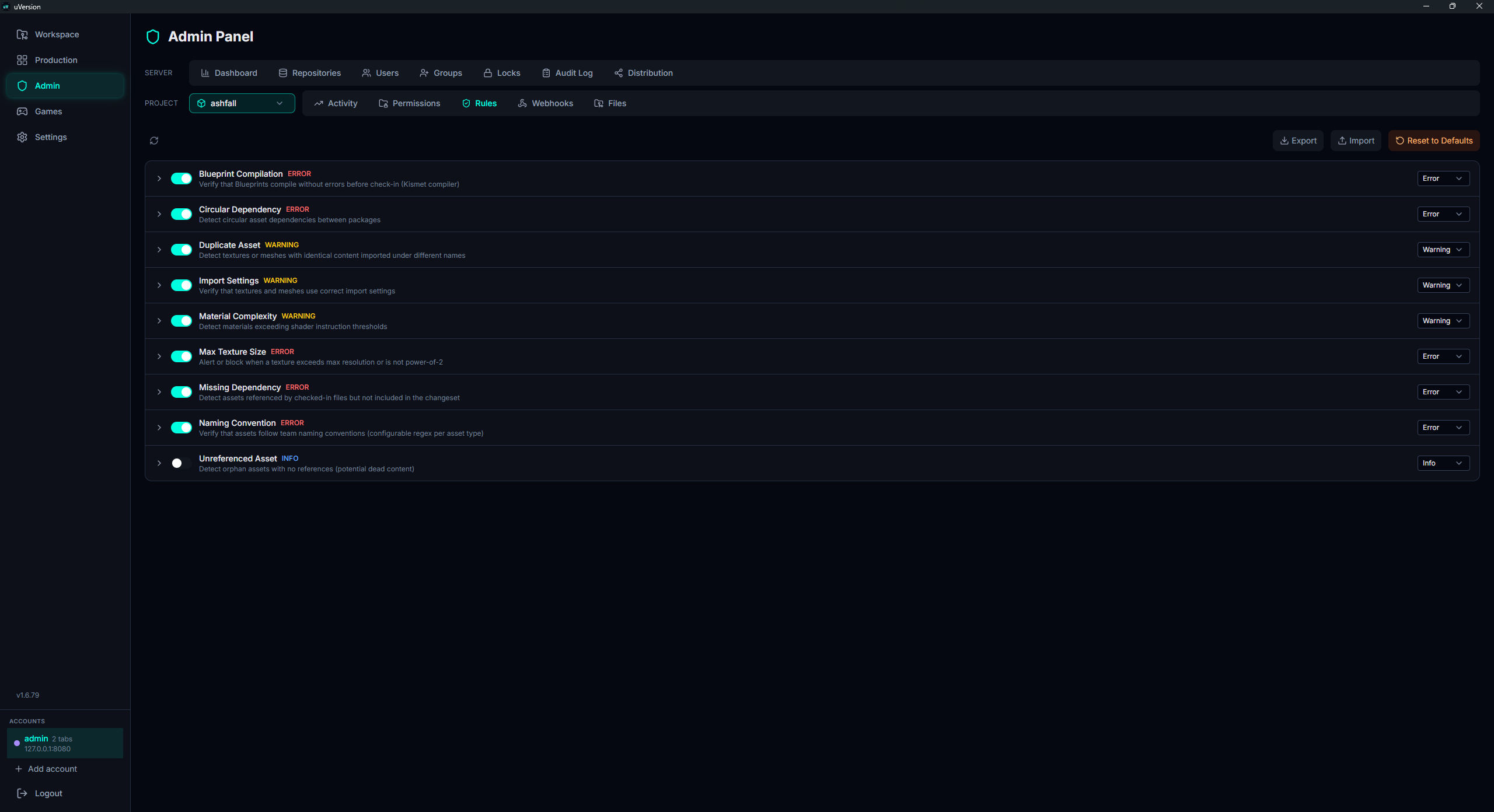
2. Enable the rule
Click the toggle to the left of the name. Saving is immediate: there is no save button for this action. This is the step people forget: on a fresh repository, all the toggles are off, and a rule that is off says nothing to anyone, whatever its severity.
3. Choose the severity
The dropdown on the right of the line offers Error, Warning and
Info, again with immediate saving. Only error actually blocks the check-in:
see Severities.
4. Adjust the parameters (JSON)
Click the chevron at the start of the line to expand the rule. The
Configuration (JSON) field contains its parameters; edit them, then click
Save Config. Invalid JSON blocks the save and shows the error detail below the field
(Invalid JSON: ...), and the rule then stays in its previous state.
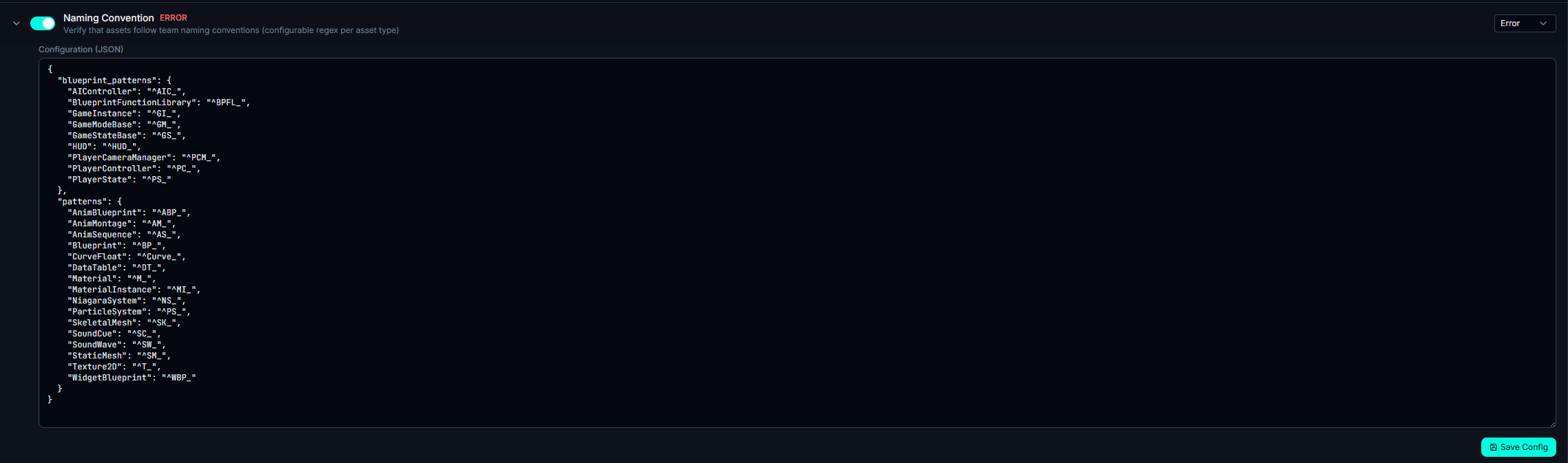
Example: lower max_texture_size to 2048 for a mobile project, or switch
naming_convention to error to enforce it strictly.
Export, import, reset
Three buttons occupy the toolbar, at the top right of the Rules tab:
- Export: downloads a
rules.jsonfile containing the state of all the rules (enablement, severity, config). - Import: reloads a
rules.jsonand applies each entry to the corresponding rules (unknown keys are ignored). - Reset to Defaults: resets all the rules to their default values. Custom configurations are lost (confirmation required).
Export / import is used to replicate a validation policy from one repository to another, or to version it offline.
rules.json in the repository
.uversion/rules.json file is applied to the repository policy only if the author of the
commit holds the permission named manage_rules (a "capability", that is, a permission attached to a
role and valid across the whole server). Otherwise the file is stored but the rules do not change. This is a
safeguard: a contributor with write access on that path cannot disable validation by committing a file.
Common pitfalls
A check-in is blocked in the Unreal editor
A rule set to error failed: the validation window lists the findings and the Proceed
button stays greyed out. Fix the asset, or (if the rule is too strict for your context) lower its severity to
warning, or disable it.
Reset wipes my settings
Reset to Defaults is destructive for your custom configurations. Do an Export first if you want to be able to roll back.
A rule seems to do nothing
Three checks, in this order:
- Where is the person submitting from? From the desktop client, the command line or the Rider plugin, no rule is evaluated (see Where the rules actually apply).
- Is the rule enabled? On a fresh repository, they are all disabled at the start.
- Is its severity the right one? Only
errorblocks the check-in;infointerrupts nothing.