
Wiki
Unreal Engine Plugin
uVersion plugin for Unreal Engine: native version control in the editor, Blueprint diff, Project Health audit, and the two rules that most often block a submit.
Prerequisites
.uversion/ folder by walking up from the project; if it finds none, and if no authentication token
was saved earlier, it does not activate at all and Unreal stays without version control.
This is not a breakage: it is what stops it from forcing itself onto your projects that are not versioned with
uVersion. Open the project from the folder cloned by the desktop client, not from a copy dropped
elsewhere.
Installation
The uVersion plugin is distributed as a precompiled binary, managed by the desktop client. No compilation on your side, no source files to handle. It is never versioned: it does not come with the repository, and it must not be submitted into it. Each machine installs the binary matching ITS Unreal version and ITS system.
Supported Unreal versions: 5.6 and later.
1. Open the workspace in the desktop client
Install the uVersion desktop client, log in, then open the workspace that contains the Unreal project. Everything happens from the client: there is no archive to download, nor any to unpack into the project by hand.
2. Let the client detect the project
The client looks for your .uproject (the file that describes an Unreal project) under the root of the
workspace, as long as it is not buried more than three levels deep. As soon as it finds it, an Unreal
bar appears at the top of the workspace tab, and it places the plugin matching your version
of Unreal into Plugins/uVersion/. The badge on the left carries the plugin's state and its version
number: that is also where updates are read.

3. Open the project in Unreal
The plugin is active immediately. Nothing to tick in the editor's Plugins window, nothing to restart: if it was missing, it is because the client has not placed it yet, not because it still needs enabling.
Later: updates
The desktop client checks for new versions when the project opens and periodically afterwards. Beware, the automatic check does not do the same thing in the two cases:
- Plugin absent: it is installed without asking you anything. That is what makes the first startup seamless.
-
Plugin already present but out of date (new version, or change of Unreal version): the client
merely notifies you. It never replaces an installed plugin on its own. The badge
of the Unreal panel then switches to
Update ready.
To apply the update: close the Unreal editor, then click the badge. A loaded plugin
cannot be replaced on disk; if the editor is still open, the badge shows
Restart UE.
First connection
In the normal case, there is nothing to connect. The plugin selects itself as the version control provider as soon as it detects a uVersion workspace around the project, or a token already saved. Your credentials are taken from the desktop client, with no re-entry. Opening the project is enough.
The three steps below are only needed if this automatic selection did not happen.
1. Open the Revision Control menu
It sits at the bottom right of the editor's status bar, not in the top menus. It
opens upward and carries Unreal's actions, including Submit Content, plus a
uVersion section with our Audit Project (Project Health) entry. Pick
Connect to Revision Control.

2. Choose uVersion in the Provider list
The Revision Control Login window opens. Drop down Provider and pick uVersion. When the workspace is recognized, the window announces it itself in green (Automatically configured from workspace) and the Workspace, Server URL and Username fields are already filled in: there is nothing to enter.

3. Confirm with Accept Settings
The Accept Settings button, at the bottom of the window, applies the choice and closes the window. The status bar then shows Connected to followed by the repository name and your username. The choice is remembered: later openings of the project will not go through this again.
Check out an asset, then submit it
The full path from the editor, on a content file. Code never leaves from here: see Code goes through the desktop client.
1. Look at the asset's state before starting
Each Content Browser thumbnail carries a badge that says where the asset stands: checked out by you, checked out by someone else, or out of date compared with the server. The tooltip gives the full sentence, for example File is out of date, sync to get the latest version. In that case, sync first (right-click, Revision Control, Sync): starting work on an out-of-date version means preparing a conflict.

2. Check out the asset
Right-click on the asset, Revision Control submenu, then Check Out. Everything is there: Sync, Check Out, Check In, History, Diff Against Depot, Revert, as with any other Unreal provider. Artists have nothing new to learn.
In practice you will often have nothing to do: as soon as you modify an asset, the plugin places the lock on the server side by itself, without a manual checkout.

3. Compare before submitting
Diff Against Depot opens the editor's standard visual comparison tool, including on a Blueprint: the two revisions are shown side by side, and the nodes added, removed or modified are outlined. Works on any commit in the history, from History.

4. Submit
Right-click, Revision Control, Check In on the selection, or Submit Content in the status-bar menu to send everything at once. The window lists the files concerned, including deletions, and requires a description. At submit time, the plugin cleans up the redirectors left by your renames and runs the active validation rules: a rule in error stops the submit and names the files at fault.

What the plugin does in Unreal
Project Health: audit the project
The status bar's Revision Control menu contains an
Audit Project (Project Health) entry. It walks the project's asset registry
without loading a single asset, and produces a health report: naming, folder structure,
dependencies, orphaned content, costs. It works offline (the report is written under
Saved/uVersionAudit) and sends it to the server when you are connected, where it feeds the
Project Health tab of the desktop client.
Redirector cleanup
When you rename or move an asset, Unreal leaves a redirector behind: a small forwarding file that points the old path to the new one, so that assets which referenced the old name keep working. They pile up fast and end up making the tree unreadable. The plugin detects them and cleans them at checkin time, updating the references in all the affected assets.
Pre-checkin validation
The plugin can run a series of checks on the submitted files: Blueprint compilation, naming convention, texture size, import settings, missing dependencies, circular dependencies, orphaned assets, duplicates, material complexity. Nine rules in all. A rule in error blocks the submit, a rule in warning allows it after confirmation.
Reconciliation at startup
When the project opens, the plugin compares the state of your assets with the server. It walks Content/
and the Content/ folders of the project's plugins, and automatically checks out any asset found
writable on disk that was not already. The intent is to protect you: a file you had started to modify
cannot be grabbed by a teammate between two sessions.
Code goes through the desktop client, not through Unreal
The plugin refuses the submission of code files: .cpp, .h,
.hpp, .c and .cs. The attempt stops on a blocking window that
names the files at fault. This is not a defect: the desktop client compiles before sending and publishes the
editor binaries your teammates fetch at sync. A code commit sent from the editor would miss
both, and would suspend the distribution of binaries for the whole team.
So submit your code from the desktop client. Content files, for their part, remain perfectly free to leave from Unreal.
.uasset submit. The message tells you to submit your code from the
desktop client first.
This is the most common block, and it readily lands on someone who does not write code: it is enough for a source file to have been made writable on disk for the startup reconciliation to have checked it out on its own. The reason is real: an asset saved against unsubmitted code breaks everyone who syncs it, their binaries not having the code it depends on.
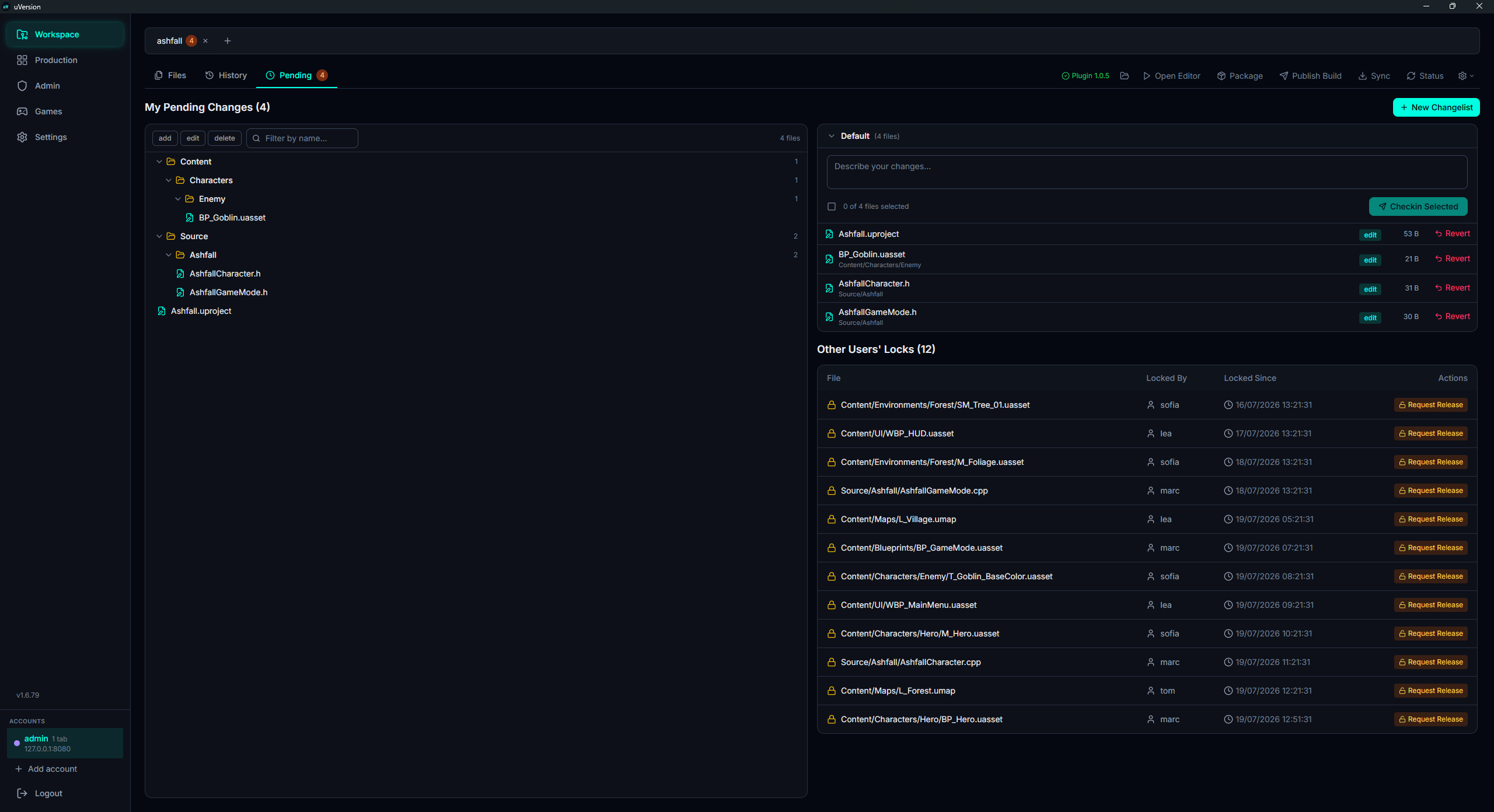
The unblock: open the Pending tab of the desktop client, the My Pending Changes list, spot the code files, and do a Checkin Selected if you modified them, or a Revert if you did not touch them. Your content submit then goes out normally. It may take a few seconds, the time for the editor to refresh its view of the locks.
Common issues
No uVersion menu: the editor ignores version control
The project is probably not in a uVersion workspace. Check that a .uversion/ folder exists
at the root of the cloned folder, and that you are indeed opening the project from that folder and not from a copy dropped
elsewhere.
« Failed to connect to source control »
Check that the desktop client is running and that you are logged in to it: it is what holds your credentials and knows how to talk to a self-signed server. If the account that owns the workspace is not logged in to the client, the plugin refuses to work under another identity, and that is intended.
A submit is refused although I did not touch any code
You hold the checkout of a code file. See Code goes through the desktop client.
I want an asset someone else has locked
This is not requested from Unreal: the plugin has no release-request function. Go through the desktop client, Pending tab, Other Users' Locks section, Request Release button on the file's row. The holder receives a request as a card in the Production board.
The plugin does not update
This is the expected behavior: the automatic check installs a missing plugin, but it merely
signals an update. Close the Unreal editor (a loaded plugin cannot be replaced), then click the
Update ready badge in the desktop client's Unreal bar to apply it.
A validation rule never fires
The nine rules ship disabled. An administrator must enable them per project from the Rules tab of the Admin panel.