
Wiki
TLS fingerprint
The server generates a self-signed certificate at install. Each client confirms its fingerprint on first connection.
uVersion encrypts every connection over HTTPS by default, with no domain name and no purchased certificate. The server generates its certificate on first startup, the administrator shares its fingerprint with the team, and each workstation confirms it once. This is the TOFU model: trust on first contact, exactly like SSH when it asks you to confirm a machine's fingerprint the first time. After that, the client compares it on every connection and refuses to talk to a server that has changed.
The procedure has two stages: find the fingerprint on the server, once, then confirm it on each workstation, once per workstation. The rest of this page is reference material, to read the day something changes.
Find the fingerprint
It is shown at the end of the installation, next to the admin password. After that, there are three ways to retrieve it, from the simplest to the most manual.
1. From a browser, with nothing to install
The server exposes an information page with no authentication: open https://YOUR-SERVER:8443/api/server-info. No sudo, no SSH access, no uVersion account: it is by far the shortest path.
The browser first shows a security warning. This is normal and expected: the certificate is self-signed, and no public authority knows it. Continue to the site.

The page that then appears is a raw block of data. The fingerprint is the value of the tls_fingerprint field: a sequence of hexadecimal bytes separated by colons. It is this whole string that you will pass to the team.

2. From the server logs
The server rewrites the fingerprint to its logs on every startup. This method works wherever you placed the data directory:
# Linux (paquet .deb)
sudo journalctl -u uversion-server | grep "TLS fingerprint" | tail -1

# Docker
docker compose logs server | grep "TLS fingerprint" | tail -1
3. In the fingerprint file
This file is written next to the certificate, so in the directory of [tls] cert_path as it appears in your config.toml. The paths below are the default values: if you moved the data directory, first read cert_path from your configuration.
# Linux, dossier de donnees par defaut
sudo cat /var/lib/uversion/data/tls/fingerprint

# Windows
Get-Content "C:\ProgramData\uVersion\data\tls\fingerprint"

# Docker : chemin fixe par l'entrypoint, sur le volume de donnees
docker compose exec server cat /data/tls/fingerprint
Confirm on the client
Once per workstation, and once for all. The action depends on the tool.
Desktop client
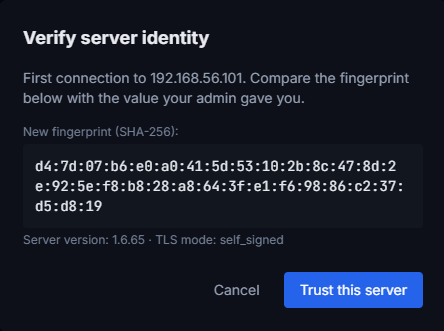
Fill in the login screen as usual. On the first connection to this server, instead of logging you in, a Verify server identity window opens. Compare the fingerprint shown with the one your administrator shared, then click Trust this server if they match: the connection resumes on its own right after. If they differ, Cancel, and go ask why.
CLI uversion
uversion trust https://uversion.example.com:8443          # interactif
uversion trust https://uversion.example.com:8443 --yes    # sans question (CI, script)
uversion trusted                                          # liste les serveurs epingles
uversion login <url>                                      # propose l'epinglage si besoin
uversion trust is interactive: it shows the host, the server version, the TLS mode and the fingerprint, reminds you to compare with what the administrator passed along, then waits for a y/N confirmation. Any other answer cancels without pinning anything. The --yes option skips this question, for a script or continuous integration: it pins without anyone looking, to be reserved for a network you control.
uversion login offers the same confirmation on its own when the server is not yet pinned: on a workstation, there is usually nothing to run beforehand.
Unreal Engine plugin
Run uversion trust <url> once in a terminal before opening the project, or log in first from the desktop client: the plugin follows its pinning. A native dialog in the editor is planned for later.
Rider plugin
It uses uversion underneath. One uversion trust <url>, and Rider goes through.
If the fingerprint changes
The client refuses to connect and says so clearly. Do not re-confirm out of reflex: check first with your administrator, through a channel other than the connection in question. Three possible explanations: a server reinstall, a deliberate certificate rotation, or someone placed between your workstations and your server. Once you have the explanation:
- Desktop client: Trust new fingerprint button in the alert dialog.
- CLI:
uversion mistrust <url>thenuversion login <url>.
Regenerate the certificate
The certificate is valid for ten years by default: there is no renewal to plan. To force a rotation (suspected compromise, audit requirement):
# Linux
sudo rm /var/lib/uversion/data/tls/cert.pem /var/lib/uversion/data/tls/key.pem
sudo systemctl restart uversion-server

# Windows
Remove-Item "C:\ProgramData\uVersion\data\tls\cert.pem"
Remove-Item "C:\ProgramData\uVersion\data\tls\key.pem"
Restart-Service uVersionServer
The server regenerates a certificate and a new fingerprint on startup. Warn the team and reshare it: every workstation will have to re-confirm.
Provide your own certificate
You can drop in your own certificate, issued by your internal PKI or by a public authority. There is no option to enable: on startup, the server reuses the files present at the [tls] cert_path and [tls] key_path paths, and recomputes the fingerprint. This only works if your server has a DNS name: no authority issues a certificate for a private IP address.
Three format constraints, each of which has already cost someone an evening:
- the certificate file contains the full chain, leaf first (certbot's
fullchain.pemhas exactly this form); - the private key is an unencrypted PEM: a key protected by a passphrase will not be decrypted;
- drop in both files before restarting. If it finds only one, the server considers the state incomplete and regenerates a self-signed pair over the one that remained.
What this changes for the workstations:
- Browser: no more warning, provided you open the server by the name carried by the certificate. By its IP address, the warning remains.
- Already-pinned workstations: the fingerprint changes, so each one will see the alert described above and will have to re-confirm. Warn them before the swap, otherwise the whole team hits an interception message at the same moment.
- Renewals: every renewal changes the fingerprint and restarts this ritual, and the certificate is only re-read on server startup. With a 90-day public certificate, that is six team-wide re-confirmations a year: prefer a long duration until this cost is absorbed.