
Wiki
Storage & GC
The Storage view of the Files tab: per-repository storage dashboard (size, deduplication, growth) and garbage collection, purging old revisions, orphan chunks, phantom files.
Introduction
The Storage view shows the disk usage of a repository (a project versioned on the server) and provides a garbage collection (GC) tool to reclaim space by purging old revisions and data that has become useless.

Access and roles
The Files tab and its Storage view are available to the super admin and to the project_admin on the repositories they administer, including running GC. Global server statistics and the licence, on the other hand, are reserved for the super admin (elsewhere in the panel).
The metrics
The Storage view opens on three cards, Total Size, Files / Revisions and Dedup Ratio. Then come the Growth (Last 30 Days) histogram, then the Largest Files table. The refresh button, at the top left, recomputes everything.
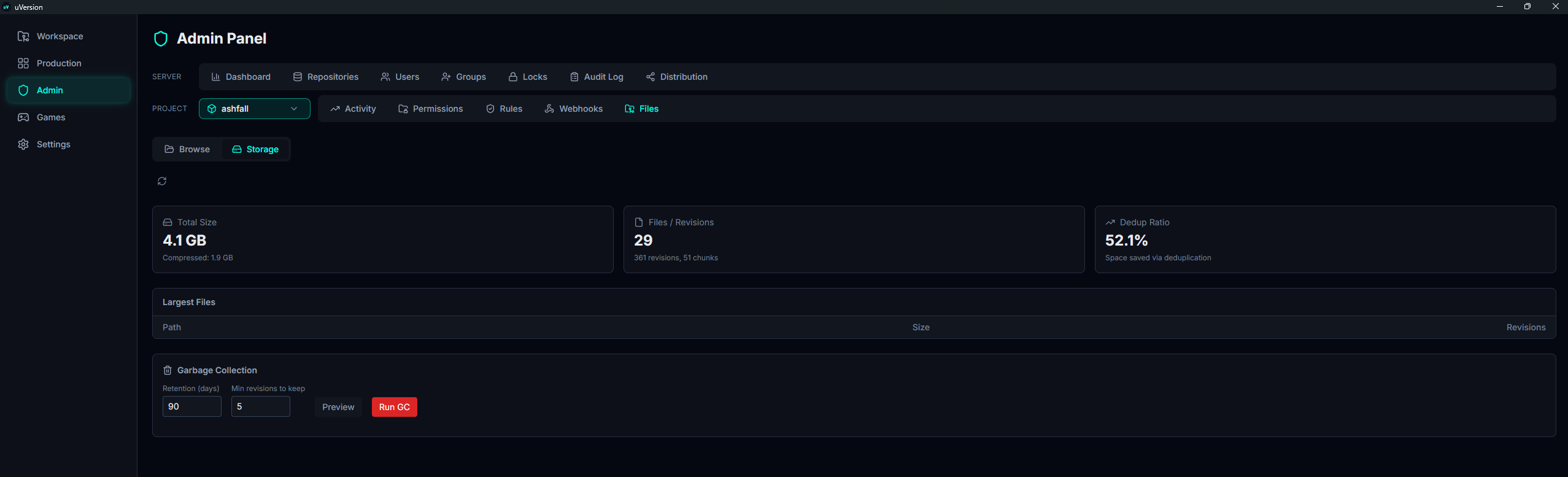
What each figure means:
- Total Size: the total size of the files, with just below it the compressed size actually occupied on disk.
- Files / Revisions: the number of files, and below it the number of revisions and chunks.
- Dedup Ratio (%): the share of space saved through chunk sharing and compression.
- Growth (Last 30 Days): the cumulative size day by day. Hover over a bar to read its date, its size and its number of revisions.
- Largest Files: the 20 largest files, with their size and their number of revisions.
These figures help spot a repository that is ballooning: a large binary file committed again and again, or abnormal growth over the past 30 days.
Garbage collection
The Garbage Collection block sits at the bottom of the Storage view. It purges old history according to two parameters:
| Parameter | Default | Role |
|---|---|---|
| Retention (days) | 90 | Age below which a revision is always kept. |
| Min revisions to keep | 5 | Number of recent revisions kept per file, regardless of their age. |
1. Set the two parameters
Enter Retention (days) and Min revisions to keep in the two fields, to the left of the buttons. They start on the default values from the table above, 90 and 5. Reminder: a revision is purged only if both conditions are met.
2. Run a preview with Preview
Preview simulates the purge without deleting anything. A yellow banner appears below the buttons: "Preview: X revisions would be deleted across Y files, Z phantom file entries would be removed". This is the moment to check the order of magnitude; if the number surprises you, raise the retention rather than run.

3. Execute with Run GC
The red Run GC button runs the purge. The green completion banner announces "GC complete: X revisions deleted, Y orphan chunks cleaned, Z phantom file entries removed", the metrics at the top reload, and the run is recorded in the audit log.

What GC deletes
- Old revisions: those older than Retention (days) AND beyond the Min revisions to keep most recent per file. Then their chunks, if they are no longer referenced by any other revision.
- Orphan chunks: the data blocks that no revision uses anymore after the purge.
- Phantom files: file rows that were never really committed (invalid path or an entry left pending), beyond a fixed 7 day window (not configurable).
The deletion markers (tombstones) of erased or obliterated files are spared: they serve to propagate the deletion to clients during sync, and so must not disappear.
Common pitfalls
Preview reports very little
Normal if the repository is recent or if the history fits within the retention. GC only touches revisions that are both old enough and beyond the last N per file.
Preview and Run do not show the same counters
Preview cannot predict the exact number of chunks and revision-chunk links deleted: it only reports the revisions, the scanned files and the phantom entries. Orphan chunks appear only at Run time.
Lowering retention to reclaim space
Possible, but you lose history. On a project where you must be able to go far back, keep a comfortable retention and act instead on the large files (see the list of the largest files, and the .uversionignore to avoid tracking regenerable artifacts).